

Scheduling and viewing meetings
 Go to Networking-> Meetings

All appointments made before or during the event by participants are shown here. Furthermore, as an event organiser you can schedule meetings between participants here!
- Click on

- Give the meeting a title, fill in the name of meeting initiator, give an indication of how long the meeting should last
- Click on

Create Meeting
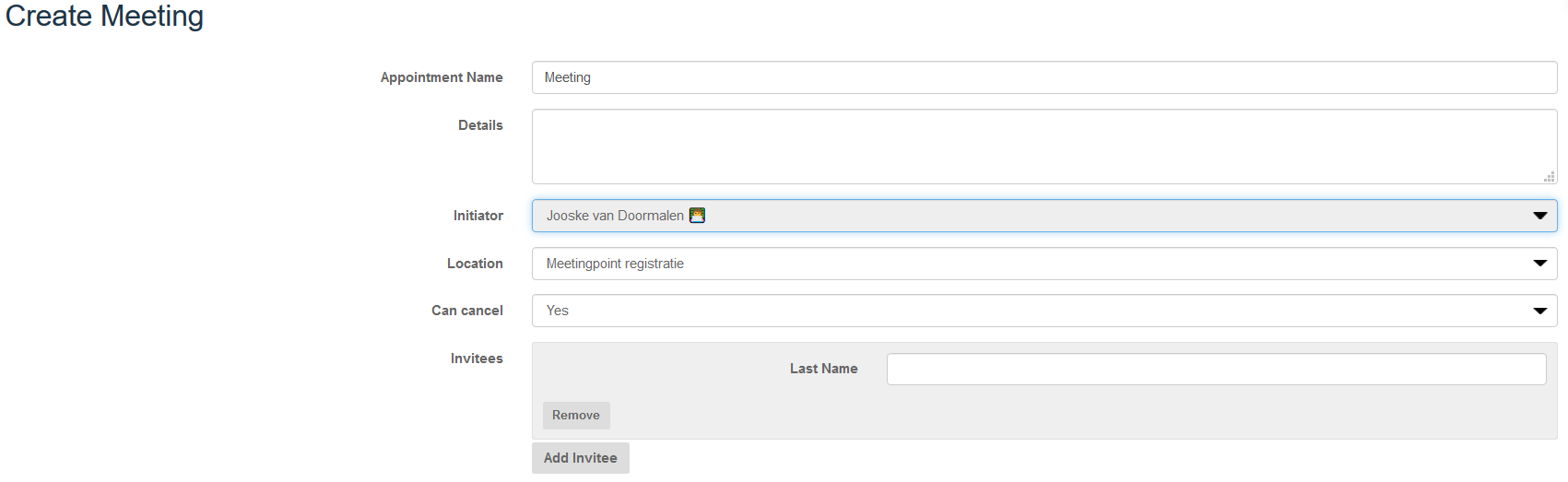
Appointment name Give the appointment a name or adjust this in case of existing meeting.
Details Write a short description of the goal of the meeting
Initiator Choose the initiator of the meeting from the pull-down menu.
Location Choose a meetingpoint from the pull-down menu
Can cancel Specifiy whether the participant can cancel the meeting
Invitees Add participants to the meetings. Start by typing a participant’s name and select from the menu.
Time
Time Indicate when the appointment will take place.
Duration Indicate how long the appointment should last
Go to Networking-> Meetings
All appointments made before or during the event by participants are shown here. Furthermore, as an event organiser you can schedule meetings between participants here!
- Click on
- Give the meeting a title, fill in the name of meeting initiator, give an indication of how long the meeting should last
- Click on
Create Meeting
Appointment name Give the appointment a name or adjust this in case of existing meeting.
Details Write a short description of the goal of the meeting
Initiator Choose the initiator of the meeting from the pull-down menu.
Location Choose a meetingpoint from the pull-down menu
Can cancel Specifiy whether the participant can cancel the meeting
Invitees Add participants to the meetings. Start by typing a participant’s name and select from the menu.
Time
Time Indicate when the appointment will take place.
Duration Indicate how long the appointment should last
Go to Networking-> Meetings
All appointments made before or during the event by participants are shown here. Furthermore, as an event organiser you can schedule meetings between participants here!
- Click on
- Give the meeting a title, fill in the name of meeting initiator, give an indication of how long the meeting should last
- Click on
Create Meeting
Appointment name Give the appointment a name or adjust this in case of existing meeting.
Details Write a short description of the goal of the meeting
Initiator Choose the initiator of the meeting from the pull-down menu.
Location Choose a meetingpoint from the pull-down menu
Can cancel Specifiy whether the participant can cancel the meeting
Invitees Add participants to the meetings. Start by typing a participant’s name and select from the menu.
Time
Time Indicate when the appointment will take place.
Duration Indicate how long the appointment should last